
Roles and organisation
Everyone has their own rights. Every request reaches the right person.
As soon as a company grows beyond a handful of people, the manager can no longer approve everything alone. With Cloketa, you share out rights between the owner, administrators, HR and managers, and you divide the company into teams: each manager handles their teams' corrections day to day, while the administration and HR keep control of payroll and exports. Each worker only sees their own data.
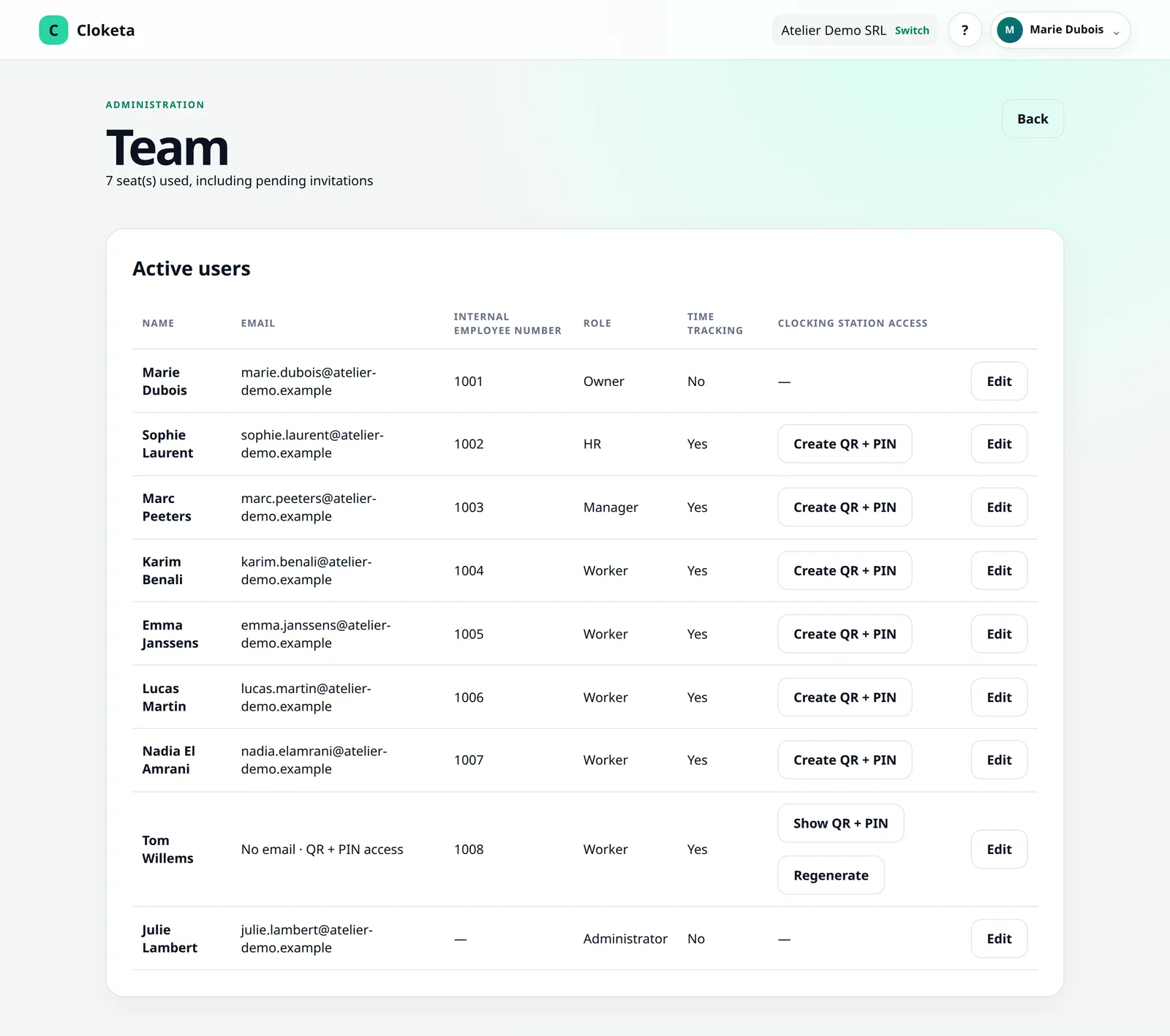
Who does what in Cloketa
Roles are assigned company by company. The same person can be a worker in one company and a manager in another.
Owner
The person who creates the company and accepts the contract. They can do everything: subscription and billing (subscribing, changing plan, cancelling, payment portal), company settings, team, reports, corrections, schedules, month closings and all exports. They receive the billing emails and can find the history of accepted terms and conditions. Their role is protected: it can be neither assigned nor removed in the application. A transfer of ownership is done on request to support, after verification.
Administrator
The same rights as the owner, subscription and billing included, except for anything to do with ownership: they cannot change the owner, reset the owner's two-factor authentication or make themselves owner. Together with the owner, they are Cloketa support's contact person.
HR
Manages staff and teams: invitations and deactivations, teams, sub-teams and managers. Sees the whole company, decides on corrections, schedules and month closings, and has access to the payroll export, the inspection file, the archives and the full export. No access to the subscription or company settings.
Manager
Supervises the clockings of their teams and their sub-teams: reports, live attendance, corrections to approve or reject (with a mandatory reason when rejecting), disputes to settle, schedule exceptions. They are notified of their teams' corrections and monthly validation reservations. They never decide for themselves. No payroll export, no inspection file, no month closing, no settings, no team management, no subscription.
Worker
Only sees themselves. They clock in by choosing their workplace, view their hours (and download them as CSV or PDF), request corrections, can dispute a correction applied by the employer until the month is closed (if the company has enabled this) and validate their monthly statement, with a reservation if needed.
Worker without an account. A casual worker, a student or a labourer without an email address can be created without an account. They clock in only on a clocking station, with their personal QR or employee number, then their PIN code, and never log in to the application. Give them the terms of use as a PDF: the Team screen reminds you of this, with the download link. As they have no account, they do not validate a monthly statement: you can give them their statement as a PDF.
The owner, administrators, HR and managers who only manage are not counted in the price. They only count if they clock in themselves. See pricing
Data leaving Cloketa stays in safe hands
- Owner, administrators and HR: reports, CSV, PDF, payroll export, inspection file, period archives and the company's full export.
- Managers: live attendance and reports for the workers in their teams and sub-teams, viewable and downloadable as CSV or PDF, without the payroll export, inspection file, archives or full export.
- Workers: their own hours, as a report, CSV or PDF.
Decisions always taken by someone else
- A manager never approves their own corrections: they are decided by another manager.
- When the owner corrects their own day, the correction is marked as a self-correction and flagged to the other managers.
- A rejection always comes with a reason, and every decision (acceptance, rejection, settled dispute, closing, reopening) keeps its author and date.
The organisation chart
Map out your company the way it actually works
Create your teams and sub-teams (a workshop, site teams by region, a shop, the kitchen and the dining room…), attach each worker to their team (one per worker) and appoint its managers: a team can have several, chosen from the people with the Manager role. Each manager supervises their teams and their sub-teams. A correction from a labourer in the Namur team goes to the Namur team leader, not to the boss.
- Reports per team: each manager only sees and downloads the reports for their teams and sub-teams.
- The right decision-maker: a request goes to the managers of the worker's team. If the team has no manager, it goes to the managers of the parent team, then to the administrators and the owner.
- The HR role: manages staff (invitations, deactivations, teams and managers), sees the whole company, exports data (payroll export and inspection file included) and decides on corrections, schedules and closings, without access to the subscription or company settings.
- Closing by the administration: closing the month is up to the owner, administrators and HR.
- Overview preserved: the owner, administrators and HR see the whole company.
Included in the Enterprise offer; optional in the other plans, at €0.50 excl. VAT per active worker per month.
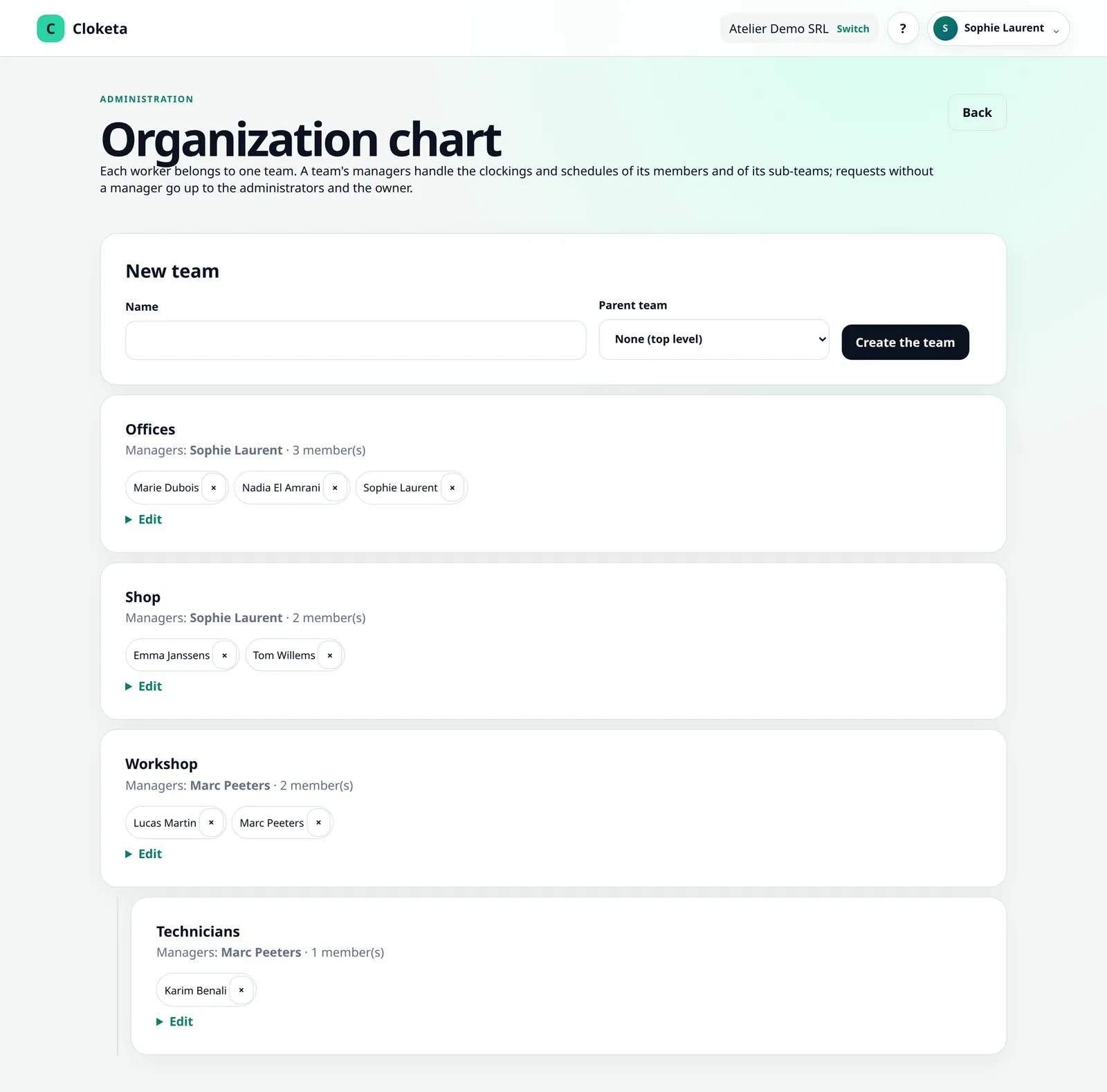
An installation company with 14 people
Julie, the managing director, is the owner. Her business partner Marc is an administrator. Nadia manages staff and rotas: she has the HR role. The company has two teams: Sites (manager: Karim, site foreman, who also clocks his own days) and Workshop (manager: Nadia).
Illustrative example.
- Monday, 17:30
Tom forgot to clock back in after his break. He clicks « Correct the day » on his phone and sends his request for approval. Karim, manager of the Sites team, is notified by email and by push notification.
- Monday, 17:32
Karim compares it with what he saw on site and accepts the request.
- Tuesday
Karim asks to correct his own arrival time: he cannot decide on it himself. The request goes to the parent team and then to the administration, and Marc accepts it.
- Tuesday
Lucas, an apprentice in the workshop with no email address, clocks in on the workshop's clocking station with his employee number and PIN code.
- Start of the following month
Everyone validates their statement. A reservation reaches Karim by email, and he corrects the day concerned. Nadia closes the month and downloads the payroll export for the social secretariat.
Price: 12 active workers, including Karim and Lucas (Julie, Marc and Nadia do not clock in) → Team plan, €299 excl. VAT / year.
Rights shared out, without losing control
- The owner's role is protected: nobody but the owner can change it, and an administrator cannot make themselves owner.
- A member's two-factor authentication can be reset by the owner or an administrator. An owner's can only be reset by an owner.
- When Cloketa support needs to access your workspace to help you, this is strictly controlled: a mandatory reason, re-authentication, logging and notification of the person concerned. Security and data
A few tips for sharing out rights
- Appoint at least two people with extended rights (owner and administrator): if one is away or leaves the company, access is not blocked.
- Give extended rights sparingly: what an administrator does in Cloketa commits the company.
- Give the manager role to the people who follow the teams on the ground: they handle their teams' corrections without access to payroll or the subscription. A team can have several managers, to cover absences.
- Give the HR role to the person who manages staff and payroll: they prepare the exports and close the month without touching the subscription.
- Remove access straight away for anyone who leaves the company or changes job. From the Team screen, open their profile and use « End the employment and remove access »: you choose the last day, access is cut off (QR and PIN included) and their clockings are kept. The person can be invited again later.
- Your accountant or social secretariat can be given access if you wish. This is never automatic, and you can remove it at any time.
Frequently asked questions
Which roles exist in Cloketa?
Five roles: Owner, Administrator, HR, Manager and Worker. You assign them freely, company by company.
How do I delegate approvals to managers by team?
In the organisation chart, you divide the company into teams and sub-teams and appoint their managers. A worker's requests go to the managers of their team. Teams and their managers are included in the Enterprise offer and available as an option in the other plans, at €0.50 excl. VAT per active worker per month.
Read the full answer : How do I delegate approvals to managers by team?
Does a manager see the whole company?
No. A manager is limited to their teams and their sub-teams. Only the owner, administrators and HR see the whole company. Teams and their managers are included in the Enterprise offer and available as an option in the other plans, at €0.50 excl. VAT per active worker per month.
Read the full answer : Does a manager see the whole company?
Can a manager approve their own corrections?
No. A manager never decides for themselves: their own requests are handled by another supervisor.
Read the full answer : Can a manager approve their own corrections?
Can I add a worker without an email address?
Yes. You can create a worker without an email address: they clock in only at a clocking station, with their personal QR code (or employee number) and their PIN, and never log in to an account.
Read the full answer : Can I add a worker without an email address?
Can an administrator change the owner? How do I transfer ownership?
No. The owner's role can only be changed by the owner. An administrator cannot demote the owner, promote themselves to owner, or reset the owner's two-factor authentication.
Read the full answer : Can an administrator change the owner? How do I transfer ownership?
Free trial