
Practical guide · 5 min
Organising corrections without losing the history
A forgotten clocking is not a problem. A correction made without a trace is. Here is how to set up a simple process that the team understands and that you can explain if anyone asks.
Why corrections deserve a rule
In every team, some days do not go as planned: a forgotten clocking, a longer break, a job that overruns, a delayed train. If these discrepancies are settled by message, by sticky note or by editing a spreadsheet cell directly, three problems arise:
- Nobody knows what the original value was any more.
- Nobody knows who decided, or why.
- The discussions come back at the end of the month, when nobody remembers the day.
A time record is useful because it is reliable. A correction that erases the original weakens that reliability, even when it is justified.
The principle: propose, explain, decide
A good correction process has three steps:
- The person concerned proposes the correction: the day, the exact time requested, and a short reason.
- The manager compares the original value and the proposal.
- They accept or reject it, and the decision is recorded with its author and date. A rejection always comes with a reason: the worker needs to understand why.
The original value is never erased: it remains visible next to the corrected value.
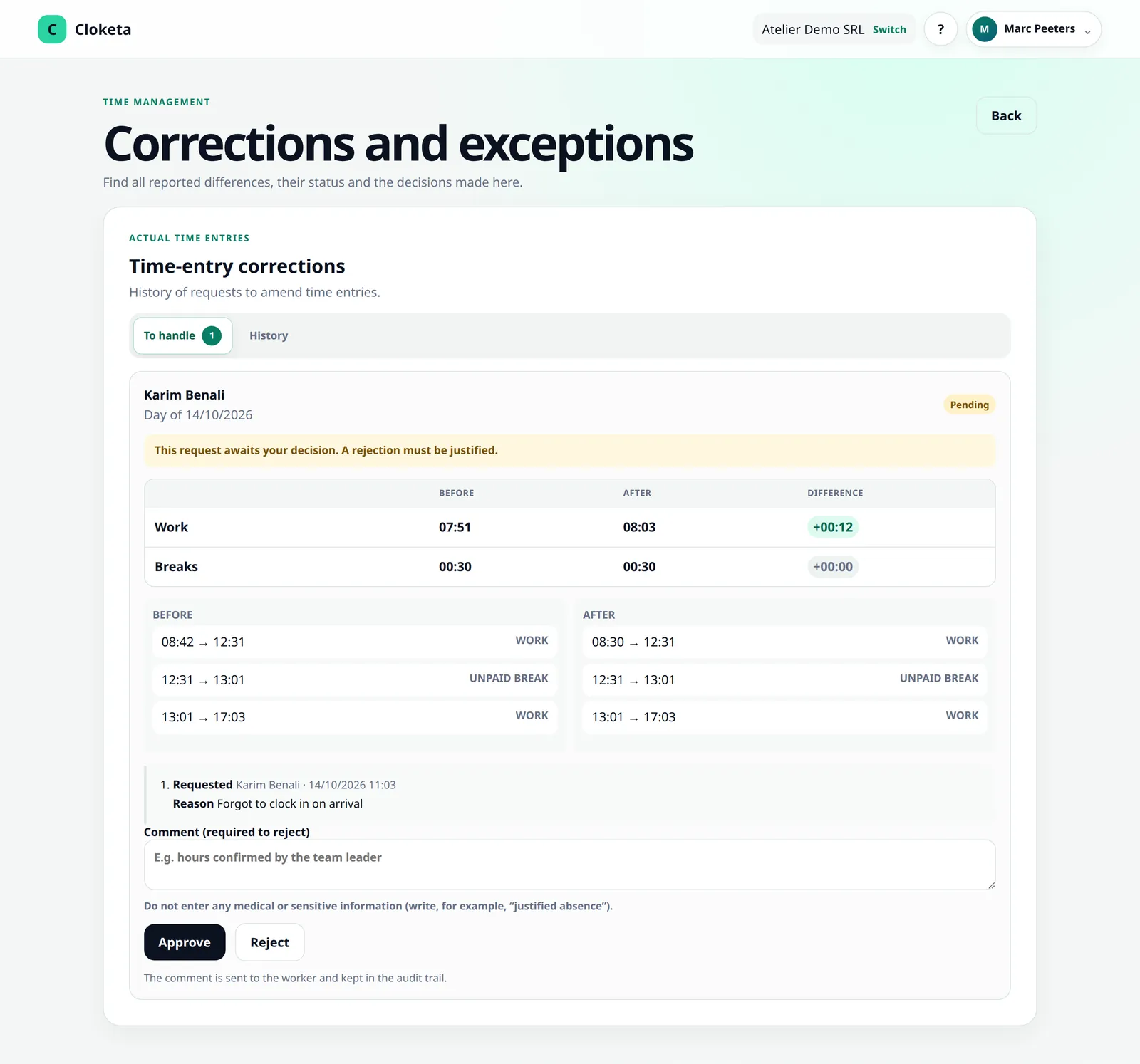
Example. Marie's arrival is clocked at 08:42 because she forgot to clock in when she arrived at 08:30. She proposes “08:30 – forgot to clock in on arrival”. The manager, who saw her arrive, accepts. The history shows: 08:42 (original), 08:30 (proposed by Marie, reason “forgot”), accepted by Thomas on 15/10 at 09:10.
Who can correct what?
Define it clearly from the start:
| Situation | Who proposes | Who decides |
|---|---|---|
| Forgotten clocking | The worker | Their manager |
| Longer or shorter break | The worker | Their manager |
| Exception to an automatic schedule (late arrival, early departure): a schedule exception, not a correction of the day | The worker or the manager | The manager |
| Error spotted by the manager | The manager | The manager, with a reason visible to the worker |
| Correction to the manager's own day | The manager | Another manager (administrator or owner) |
Avoid having the same person propose and approve their own corrections, except in a very small business where there is no alternative; in that case, the reason matters all the more.
The other way round: when the employer corrects
Sometimes it is the manager who corrects a day, for example a forgotten break they noticed. The worker must then be able to dispute that correction, with their own reason, within a clear time limit, ideally until the end of the month. Where possible, the dispute is settled by a manager other than the one who made the correction.
When nobody decides
A request that has been waiting for three weeks is no longer a request, it is a dispute in the making. Plan an escalation: if the direct manager does not decide, the request goes to their own manager, then to senior management.
Useful reasons, without sensitive data
A reason helps understand the decision later. It should be short and factual: “forgot to clock in”, “client job overran”, “train cancelled”, “early departure approved”.
Never give a medical reason or any sensitive information. Write “authorised absence” or “appointment”, not the medical reason. This is a matter of respecting privacy and data protection (GDPR).
Time limits: the rule that changes everything
The later a correction, the harder it is to verify. Set two simple time limits:
- To propose: by the next working day at the latest (or 48 hours).
- To decide: by the end of the week at the latest.
Illustrative example. In a team of 10, for instance, there may be between 3 and 8 corrections a week. Handled as they come in, they take 5 to 10 minutes a week. Left to pile up over a month, they turn into a reconstruction session of an hour or more, with more disagreements.
Rejecting a correction
A rejection is not a conflict, it is a decision. To make sure it is well understood:
- briefly state the reason (“presence not observed at 08:30, please talk to me about it”);
- prefer a face-to-face conversation for sensitive cases;
- keep a record of the rejection: it is part of the history, just like an acceptance.
Common mistakes
- Editing the hours directly without a proposal or reason: the trace disappears.
- Accepting all requests in bulk at the end of the month without reading them.
- Leaving requests pending for weeks: the worker does not know where they stand.
- Using corrections to manage the rota: if discrepancies are systematic, it is the schedule that needs reviewing, not the days one by one.
Checklist
- Roles (who proposes, who decides) are defined and communicated. In Cloketa: teams and managers configured in the Organisation module.
- Time limits for proposing and deciding are set.
- The original value always remains visible.
- Reasons are short, factual and contain no medical data.
- Pending requests are reviewed every week (see the weekly check guide).
- Repeated discrepancies trigger a review of the schedule.
What about 2027?
The recording obligation currently announced requires a system that is objective, reliable and accessible. The text has not yet been adopted, but a traceable correction process clearly points in that direction. See Time recording in 2027.
With Cloketa
The worker proposes a correction with a reason from their phone or computer. For someone on a fixed schedule, a discrepancy is reported as a schedule exception, approved in the same Corrections screen. The managers of the worker's team receive an email and a push notification, see the original value and the proposal side by side, then accept or reject in one click; a rejection requires a reason. A manager never decides for themselves, and a correction the owner makes to their own day is flagged to the other managers as a “self-correction”. If the company enables it, the worker can dispute an employer correction until the month closing. Nothing is escalated automatically after a time limit: plan a stand-in. A request goes to the team's managers; if the team has none, to those of the parent team, then to the administrators and the owner. The original, the reason, the author and the decision remain in the audit trail.
Free trial
No more corrections by message
Test the correction process with two or three workers for 14 days.
Important information Cloketa is a working time recording tool. It does not provide legal or HR advice and does not replace any official declaration or application. Each employer remains responsible for their own obligations: if in doubt, consult your social secretariat or an adviser.